It turns out the 6mm (1/4″) tape for the brother p-touch PT-1230PC computer controlled label maker is just about perfect for labeling PDIP ICs. I whipped up a small program to generate images from the chip pinouts and control the printer in raw mode to create labels.
Next step is to put a QR code on there that links to the data sheets.
Given how both physical switches and optical sensors have their own issues for using as reprap endstops, I decided to experiment with Hall effect sensors which detect the presence of a magnetic field. The idea being you place a magnet on your carriage, stick the sensor at one end and when the magnet gets close, you get a signal. Very simple and robust, no moving parts, no need for precise placement, just get the magnet at just the right distance and it triggers.
I was able to find these A3144 hall effect sensors for 19 cents each. That’s right, cheaper than switches, cheaper than opto endstops, and superior to both. And there appears to be tons of suppliers for the things, so they are not going away anytime soon. They just have three pins, GND, Vcc, and signal. The signal is normally open collector, get a magnet close and it drains to ground. Now, when trying to figure out how to interface this with the standard RAMPS hardware, I came up with the below circuit.
That’s right. The three pins are _exactly_ the same pins, in the same order, that RAMPS expects its endstops to have. The only setup you need is a 3 pin jumper cable you can stick the sensor in. Simple servo cables from pololu or any RC store work perfectly and there is no need to solder anything. When looking at the larger flat side of the sensor, the left leg is the signal so should be oriented towards the outside of the RAMPS board when plugged in.
Here is it next to the large switch and printed holder it is replacing.
Then attach it to your shaft with one face pointing towards your carriage. You can then affix the magnet to your carriage however you want, I just let the magnet stick to the motor body itself for the Z axis, but glue, tape, or a bracket would also work. Just whatever you do, make sure both the magnet and sensor are very secure to get repeatability in your measurements. Also, the sensor only detects the magnetic field in one direction, so make sure the proper (north or south) pole is facing the sensor! Just test it before permanently glueing anything.
Now, the Hall effect triggers by sinking the signal to ground, so be sure to enable the pull up resistors for your endstops and set the “INVERT_ENDSTOP” flag in your firmware.
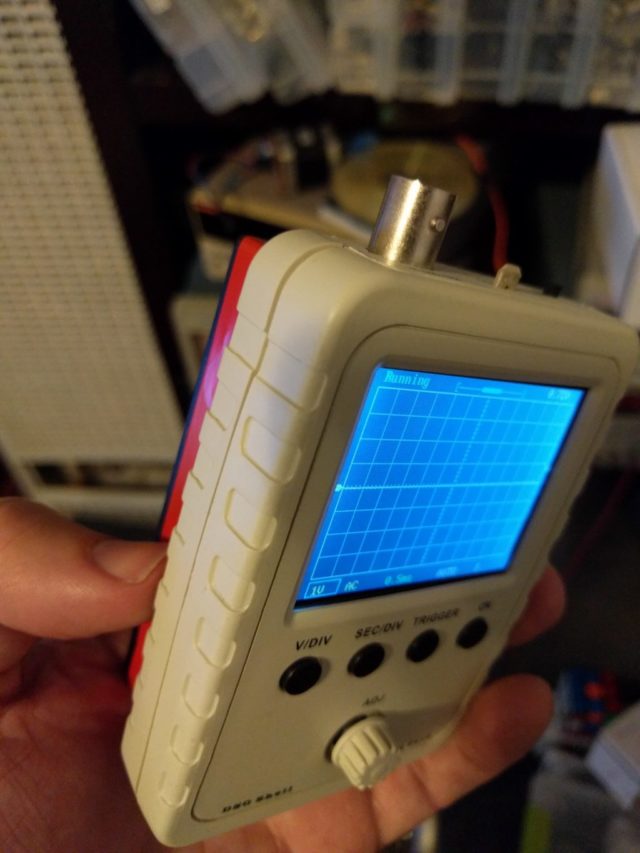
Since I was playing around with these hall effect sensors, I decided to create a little handheld magnetic field sensor that would allow me to test for the presence and polarity of magnet fields and came up with this handy device.
While playing around testing various magnets, I re-discovered something interesting, those throw away flexible refrigerator magnets are not actually just a plain magnet, but a repeating pattern of north and south poles that can be read with the sensor.
for 19 cents, this seems like a pretty useful little device. And there should be no reason to use mechanical or optical endstops anymore, these are way cheaper, more reliable and simpler.
So, it turns out I am the winner of the 2008 Underhanded C Contest. The goal of the contest is to write some straightforward C code to solve a simple task, incorrectly. In particular, you had to introduce a hidden security flaw that would stand up to code review and not stand out at all. This is different than the Obfuscated C contest in that you want your program to look straightforward and that it does one thing, when in fact it does another.
The goal this year was to write a leaky image redaction program. Given an input image in PPM format and a rectangle, it would spit out the image with the rectangle blacked out, perhaps hiding sensitive information. The tricky part was that you had to leak the redacted information. There are more details in the problem specification.
So, before I go on, here is my complete entry. See if you can figure out how the information is leaked before reading further if you like.
/*
* This is a simple redactor, it accepts a plain text ppm file, a set of
* coordinates defining a rectangle, and produces a ppm file with said
* rectangle blacked out.
*
* Usage: redact in.ppm x y width height > out.ppm
*/int
main(int argc,char*argv[]){if(argc !=6){fprintf(stderr,"usage: redact in.ppm x y width height > out.ppm\n");exit(1);}// process command line argumentsint rx =atoi(argv[2]), ry =atoi(argv[3]), rwidth =atoi(argv[4]), rheight =atoi(argv[5]);
FILE *ppm =fopen(argv[1],"r");if(!ppm){perror(argv[1]);exit(1);}//read the ppm headerunsigned width,height,maxdepth;fscanf(ppm,"P3\n%u %u\n%u\n",&width,&height,&maxdepth);printf("P3\n%u %u\n%u\n", width, height, maxdepth);//current locationsint x =0, y =0, ws =0;//fixed buffer size to avoid overflowchar buf[BUFSIZE],*c;while(fgets(buf,BUFSIZE,ppm)){for(c = buf;*c;c++){if(isdigit(*c)){if(!ws){// new number, increment location.
ws =1; x++;if(x >= width *3){
y++; x =0;}}if(x > rx *3&& x <=(rx + rwidth)*3&& y > ry && y < ry + rheight)putchar('0');elseputchar(*c);}else{
ws =0;putchar(*c);}}}return0;}
Recently I have been building the cupcake CNC 3d printer as a stepping stone for getting involved with the reprap project. This was the first time I have tried soldering surface mount components, and I must say it turned out to be quite straightforward and easy using the hotplate reflow method. The main issue was actually more psychological than anything, and that is that I wasn’t able to test the circuits incrementally as I create them. Normally, I alternate placing a few components and testing connections with a multimeter throughout a fabrication, however, with the hot plate reflow method you pretty much have to do all of the surface mount components in one go, and once you start soldering non surface mount components, you can’t really go back to using the hot plate again.
This issue was somewhat compounded in the design of the cupcake CNCs electronics in that the first testable configuration involved many different components, an ardunio motherboard, a stepper driver, host software running on a PC, and the various interconnects. Coming up with a way to test the stepper driver boards independently of the rest of the system was quite useful. I whipped up the following simple circuit to test the stepper boards. None of the component values are very important, C1 is a debouncing capacitor for the pushbutton, R1 is a pull down resistor, and R2 is to protect the LED.P1 is a power header that accepts a floppy connector power supply cord from the same PC supply that powers the stepper driver.
The ISO C 99 standard is a great thing. In addition to desperately needed things like a dedicated bool type and codifying a lot of universally implemented extensions to the language, it added some more subtle things such as compound literals. A compound literal allows you to use a C struct or union as an initialized literal value. This makes declared types more on par with built in ones, such as numbers, characters, and strings. Here I will present just about the simplest but quite useful application of this.
Many modern languages such as Haskell have a concept of a type alias. It is called a newtype in Haskell and I will borrow that terminology here. A newtype is a type that is fully equivalent at run-time and in generated code to an existing type, but nevertheless is distinct to the type system at compile time. They are quite useful in enforcing abstraction of APIs and catching a wide variety of bugs without incurring any run-time penalty. In fact, depending on the compiler, they may actually help optimization. Imagine you represent open files as an index into a table, much as the unix API does, naturally you would represent it by an int. You may have something like this, declaring fd_t as a handy synonym to show when you are working with file descriptors.
typedefint fd_t;/* write an int out to a file */void put_int(fd_t fd,int c);
Now, what happens if someone forgets the order of the arguments to put_int? since fd_t is a synonym for int, the compiler has no idea you did anything wrong and happily writes garbage to a random file. Not what we wanted at all. If fd_t were a newtype rather than a typedef synonym then the program would be rejected, because fd_t and int would be distinct types.
This brings us to the following bit of code you can place in a header file newtype.h. Using compound literals, it allows the declaration of newtypes that can be used almost anywhere you can use built in types.
#ifndef NEWTYPE_H#define NEWTYPE_H/* this can be used for type safety, to avoid accidental casting of values from one type to another and
* allowing alias analysis by the compiler to distinguish otherwise identical types
*
* NEWTYPE(new_type,old_type); declares new_type to be an alias for the already exsiting old_type
* TO_NT(new_type,val) converts a value to its newtype representation
* FROM_NT(new_val) opens up a newtyped value to get at its internal representation
*/#define NEWTYPE(nty,oty) typedef struct { oty v; } nty#define FROM_NT(ntv) ((ntv).v)#define TO_NT(nty,val) ((nty){ .v = (val) })#endif
Now we can modify the above example, instead of
typedefint fd_t;
we use
NEWTYPE(fd_t,int);
Another example would be the traditional lseek routine that comes with C. it is generally declared as something like
Now, whence is supposed to be one of the SEEK_* defined terms, and fd is supposed to be an open file descriptor, and offset is supposed to be an offset into the file. however, to the compiler on many architectures all the argument types are indistinguishable. this means that if you mix up any of them, the compiler will happliy go along. in addition, you can pass bogus values in for ‘whence’ like 5 or 6, and nothing will complain. using newtypes, you might declare the API like so.
Now, not only are you protected from mixing up any of the arguments, you are also protected from bogus values being passed into the whence argument meaning you can elide the run-time check for valid values since the compiler will check it for you.
Although this is just the simplest use of compound literals, it is already proving to be quite useful. When combined with other C99 features such as variable length arrarys you can do clever things like non-conservative garbage collection in a clean way, or just make your code that much easier to read by not having to declare temporary structures everywhere.
It seems that whenever the topic of biometrics comes up there are some that can’t stop worrying about what will happen if someone gets ahold of your biometric data. After all, how hard is it to lift a fingerprint off a glass at a pub? Will using fingerprints for authentication mean you have to wear gloves everywhere or be subject to identity theft or will you have to burn off your prints and get new ones if someone compromises your fingerprint? Well, The answers are no. The reason for the confusion probably stems from thinking of biometrics as passwords, secret things that only you have. However, this is not the case at all. The security of biometrics comes from the fact there is only one human that matches the profile, not the secrecy of the profile itself.
A fingerprint cannot be compromised. A biometric identifier is not like a password. it is not meant to be secret. Think of your fingerprint as… well… like a public key cryptographic fingerprint really. Your public key fingerprint isn’t secret. in fact, you generally want to distribute it as far and wide as possible. What makes it useful is that there is a corresponding private key that only you have that can be matched to said public key. A physical fingerprint is similar, everyone knows your fingerprint but there is only one warm human body that is associated with it. Present the warm human body (your own) that matches the fingerprint on file and you gain access. So we have the analogy that a public key fingerprint is to a private key as a physical fingerprint is to a warm human body with said fingerprint.
This of course means that biometrics are only good for ‘online’ verification, meaning there is a trusted path between your body and whomever you are identifying with. this can be anything from a physically secure ATM, a security guard that applys the test, or whatever is appropriate for the application. The security of biometrics comes not from the secrecy of the fingerprint, but the security of the path from the human being biometrically tested to the verifyer. Hence, you cannot ‘compromise a fingerprint’. You can however compromise a specific biometric system. If you find you can lift and transfer fingerprints easily with a gummy bear for a specific reader, you have broken that particular reader, but you don’t need to burn off your fingerprints and get new ones (like you change passwords when one has been compromised). you simply stop trusting anything that uses said broken reader.
PS. does anyone else enjoy the irony of using an abstract mathematical concept to explain a straightforward real world transaction?
While waiting for the parts to my very own reprap machine, I figured I would experiment a little with some possible head designs. One I am particularly interested in is something like a ‘pick and place’ machine that can manipulate objects in 3 dimensions. My simple design involves a drinking straw, a couple $3 hobby servos, a bunch of hand molded shapelock, and a few hot glue burns.
Here is the final result:
The basic idea is the bottom servo (bottom is to the left) can bend the straw left and right, and the other servo can rotate the straw in place. the bend in the straw acts as a universal joint so the object held can be rotated somewhat arbitrarily in 3 dimensions.
A simple linkage connects the top servo to the straw. I attempted a couple different things, starting with a pully system, then a gear system. neither worked out too well. The linkage turned out to be quite simple and robust.
Here it is with the attached fan I attempted to use as a vaccum pump. It did not turn out too well, the fan was scavanged from an old CPU and was never meant to be used like this, so I will need an actual vaccum pump at some point.
Everything was controlled for testing with a Wii nunchuck and an arduino microcontroller with custom code. Here is a video of it in action:
data=”http://www.youtube.com/v/SGe_1BZErEg?fs=1″>You need to a flashplayer enabled browser to view this YouTube video
So, some stuff I learned
ShapeLock is wonderful stuff. I was able to form and reform the head a few times, even fairly large changes like making room for a gear involved reheating a part of the project and shaping it by hand. And I can just melt it down again and reuse it for my next prototype.
The linkage is the way to go. I struggled a long time with gears and pullys. I imagine that if I were precision machining things and could get gears/pullys in the exact right size, things would have been different. But when it comes to the fuzzy world of hand-squished shapelock, the more forgiving linkage worked out great.
I am gonna stock up on these tiny and cheap servos. They have a very interesting and useful bug. if you try to overextend them, they go into continuously rotating mode with no modification! So you can have the same servo work as a continously rotating one at some points, but also have precise precisioning at others.
The Wii nunchuck is a great little thing. it took a few dozen lines of arduino code to interface with it and I got a joystick, 3 buttons, and a 3 axis accelerometer.